Settings overview
Open Settings with the gear icon in the top bar or Ctrl/Cmd+,. It's a single modal with a tab for each area. Press Esc to close it.
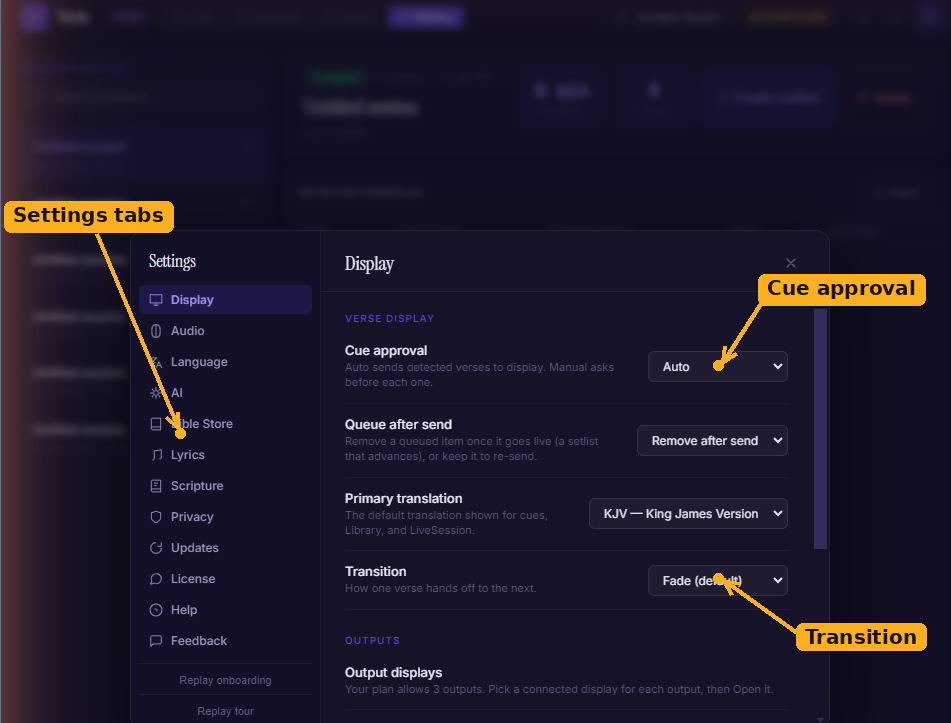
Settings opens as a single modal with a tab down the side for each area. The Display tab holds cue approval, the primary translation, and the transition style.
The tabs
- Display :cue approval mode (Auto/Manual), queue-after-send behaviour, your primary translation, the transition style, and the per-role output displays. See Presentation & output displays.
- Audio :offline mode (Whisper only) and your audio input. See AI detection & transcription.
- Language :the language of the app's interface, and the Whisper speech models you download for transcription.
- AI :the fast online transcription toggle, plus local verse detection via Ollama — daemon status, models, and detection thresholds. Covered in depth in Local AI with Ollama.
- Bible Store :install, remove, and side-load translations. See Scripture & the Bible Store.
- Lyrics :your song sources and the opt-in to contribute songs back to the shared library.
- Scripture :how projected verses look — the background behind them (theme, solid, gradient, image, or video) and their typography (font, weight, line height, and alignment).
- Privacy :what diagnostic data, if any, Verse may collect.
- Updates :your current version, a manual Check for updates, and auto-update behaviour.
- License :your activation status, expiry, Manage subscription, and Re-activate this device. See Licenses and seats.
- Help :links back to this documentation, tutorials, community, support, and the changelog.
- Feedback :send a note straight to the team.
Settings that come from your organisation
Some settings — like the Ollama address and model — can be managed centrally by your organisation's admin. Where that's the case, the field shows as read-only and Verse syncs it for you. The AI tab shows the last sync time and any sync error.