Local AI with Ollama
Verse can run verse detection and Content Studio generation against a local model using Ollama, so nothing leaves your machine. This is configured under Settings → AI.
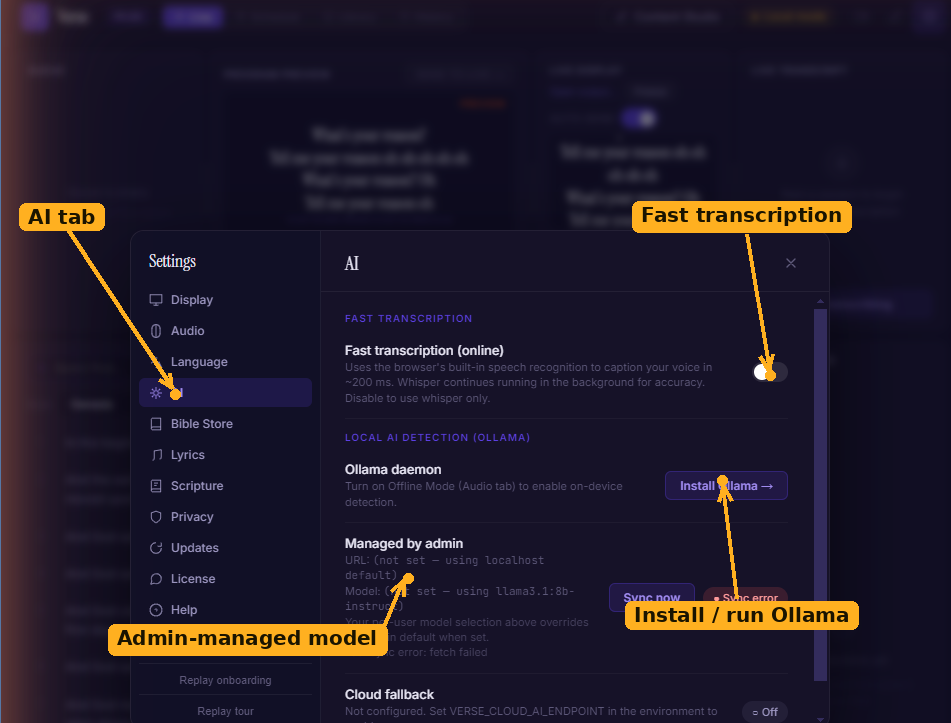
The AI tab (Settings → AI): the fast online transcription toggle, the Ollama daemon controls (here showing the Install Ollama link before setup), and any admin-managed model settings.
Requirements
Local AI is meant for capable machines. Verse only exposes the controls when:
- Offline mode is on (Settings → Audio),
- the Ollama daemon is installed and reachable, and
- your machine meets the minimums — roughly 16 GB of RAM, 10 GB of free disk, and a modern CPU (AVX2) or Apple Silicon.
If Ollama isn't installed, the AI tab shows an Install Ollama → link.
Setting it up
- Install Ollama and make sure it's running. The daemon status pill turns green when Verse can reach it.
- Pull a model from the list — Verse offers Llama 3.1 8B Instruct and Qwen 2.5 7B Instruct. A progress bar tracks the download; you can Cancel or later Remove a model.
- Once a model is ready, the detection controls appear. Verse enables the detector automatically after your first successful pull.
Tuning detection
- Enable :turn local verse detection on or off.
- Thresholds :set how confident a match must be to auto-send versus to wait for approval.
- Window / interval :how much spoken context Verse considers when matching.
Centrally-managed settings
Your organisation's admin can set the Ollama address and a forced model for everyone. When they do, those fields are read-only here and sync automatically; the tab shows the last sync time and any error.