Presentation & output displays
Verse drives separate output windows on your projector and second screens. You control the content from the main window; each output shows the congregation- or crew-facing view.
Output roles
Each output has a role that decides what it shows:
- Front of house (FOH) :the full congregation output: scripture, lyrics, media, and slides at full screen. This is the screen your audience sees.
- Stage display :a confidence monitor for the platform: the current cue, a Next up preview of the next queued item, and a wall clock.
- Broadcast :a stream-safe feed: the same content inset into a title-safe area so it sits cleanly inside a streaming or recording mix.
How many outputs you can run at once depends on your plan: Free includes one output, Plus runs up to three, and Church is unlimited.
Choosing displays
Open Settings → Display → Outputs. Each role has its own display picker listing every monitor connected to your machine; pick the screen for that role, then click Open. A display can host only one output at a time. If your plan's output limit is reached, the remaining roles are shown with an upgrade prompt.
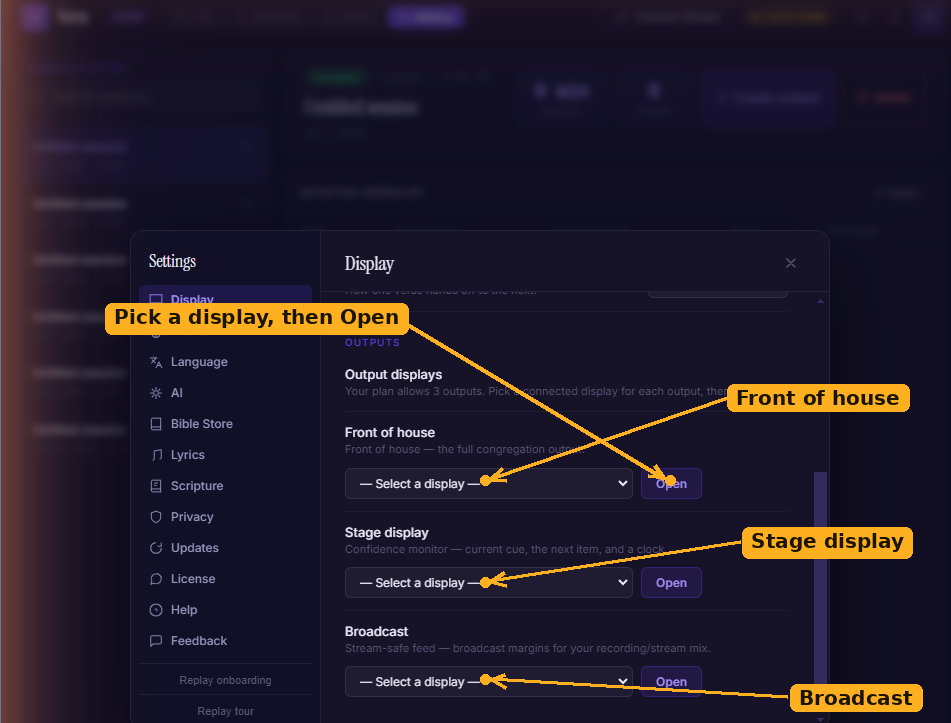
The Outputs section of Settings → Display: each role — Front of house, Stage display, and Broadcast — has its own display picker and Open button.
Opening and closing output
The output toggle :the projector icon in the top bar — opens and closes the front-of-house output. When it's on, a fullscreen window appears on your chosen display and live cues route to it. Click it again to close. Manage the stage and broadcast outputs from Settings → Display → Outputs.
If you click the toggle before picking a display, Verse takes you to Settings → Display to choose one first.
Transitions
Under Settings → Display → Transition style, pick how cues change on screen:
- Fade :a soft cross-fade (default).
- Slide :the new cue slides in.
- Cut :an instant switch.
During the service
- The Live Display panel mirrors what's on the output right now.
- Use Freeze on the Live Display panel to lock the output so it can't be overwritten by a stray click or an auto-send.