Planning a service
The Schedule screen — the service planner — lets you lay out a running order ahead of Sunday — every song, reading, prayer, and sermon segment, with a duration for each. Open it from Schedule in the top bar or press Ctrl/Cmd+2.
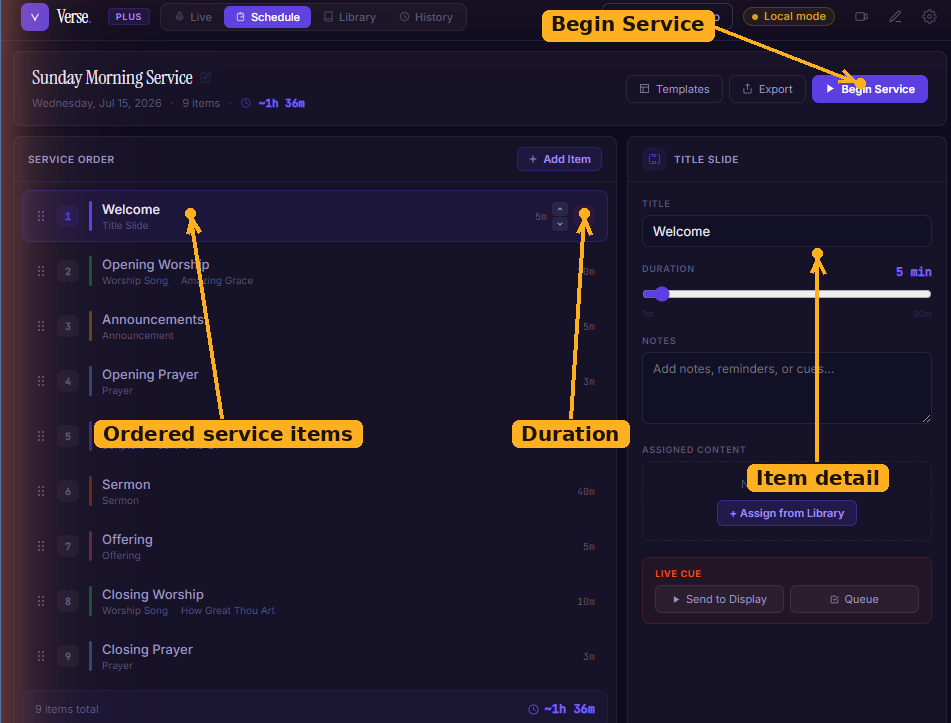
The Schedule screen: an ordered running order with a duration on each item, an item detail panel on the right, and Begin Service to open the Live Session with the plan loaded. (The app labels this screen Schedule in the top bar.)
Building a plan
- Verse starts you with a sensible template (welcome, opening worship, announcements, prayer, scripture, sermon, offering, closing worship, closing prayer).
- Add Item to insert a new segment. Each item has a type — Title, Worship, Announcement, Prayer, Scripture, Sermon, or Offering — a title, a duration in minutes, and notes.
- Drag to reorder items as the plan firms up.
- Link an item to content — a song title or a scripture reference — so it's a click away during the service.
Plans auto-save as you edit, so you won't lose your work.
Running the service
When you're ready, click Begin Service. Verse opens the Live Session with your plan loaded, so the songs and readings you lined up are right there.