Content Studio
Content Studio turns a finished service into shareable content. It reads the verses detected during a session and generates a first draft for you to edit.
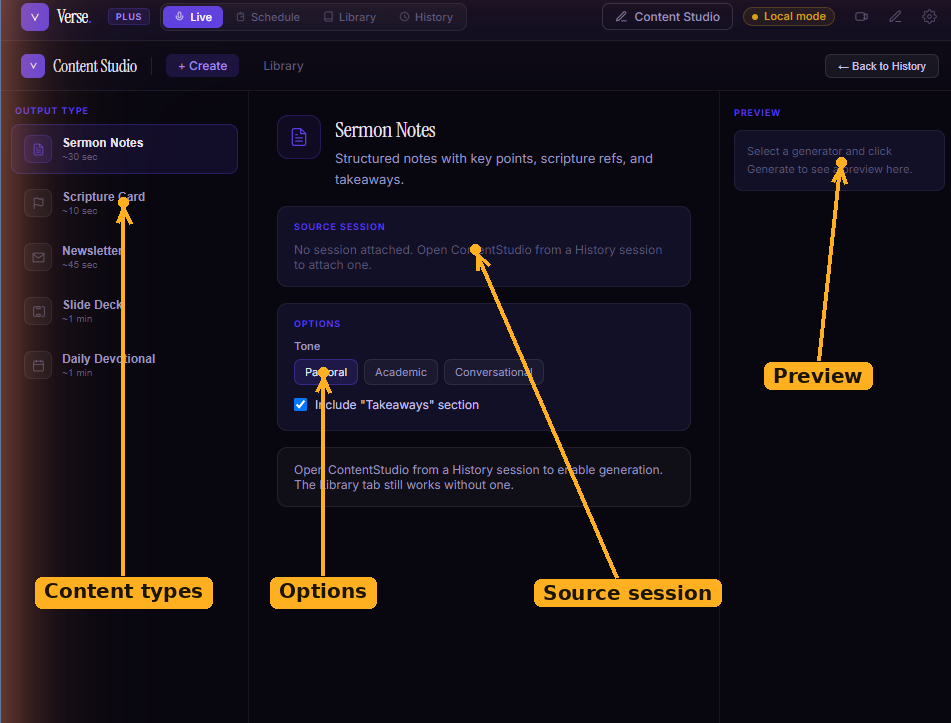
The Content Studio Create tab: choose a content type on the left, attach a source session, adjust its options, and generate a draft that appears in the preview.
What it can make
- Sermon notes :structured notes with key points, scripture references, and takeaways.
- Scripture card :a shareable image card built around a key verse.
- Newsletter :a congregation email summarising the message and its passages.
- Slide deck :a presentation generated from the sermon outline.
- Daily devotional :a multi-day plan based on the passages preached.
Generating content
- Pick a session. The quickest way is from Session history — open a past service and click Create content.
- Choose a content type and adjust its options (for example, the tone of sermon notes).
- Click Generate. Progress streams as it works, then the draft appears for review.
Everything you generate is saved under the Library tab in Content Studio, filterable by type.
Cloud or local
Content Studio shows whether generation will use a cloud model or your local Ollama model. If you've set up Local AI with Ollama, generation can run fully offline.